Ever since I began using a MacBook for personal usage, I’ve been seeing an error that prevented me from using WARP by Cloudflare.
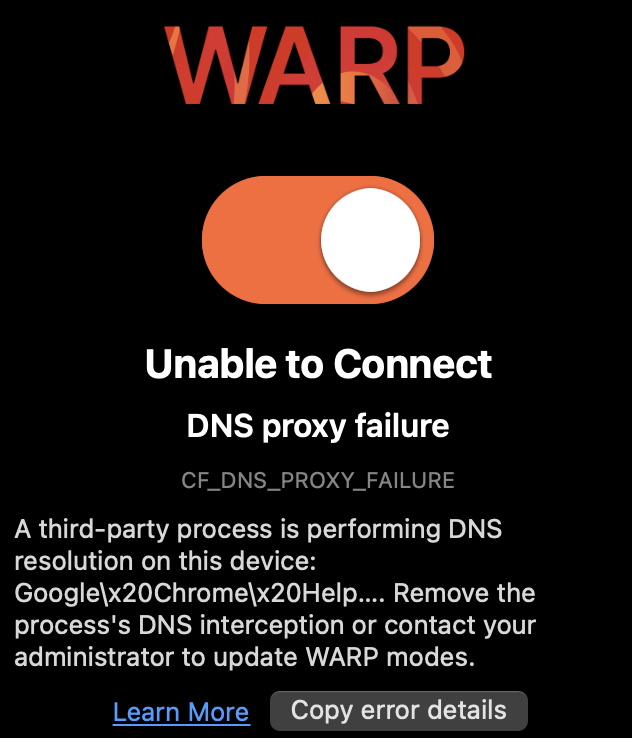 The error message,
 A third-party process is performing DNS resolution on this device often points to Google Chrome helper or mDNSResponder as the conflicting process. After spending some time in the documentation, I found some processes can cause mDNSResponder to bind to port 53, preventing WARP from setting local DNS proxy on the same port. Here are the list of applications I’ve noticed that cause this:
- QEMU (via
socket_vmnet) - Docker Desktop
- Multipass
Currently, there is no way to know which application is binding to port 53. Here’s the result of lsof:
❯ sudo lsof -iTCP:53 -iUDP:53 -n -P
COMMAND    PID           USER   FD   TYPE             DEVICE SIZE/OFF NODE NAME
mDNSRespo 7056 _mdnsresponder   29u  IPv4 0x3fab173ae40a4c15      0t0  UDP *:53
mDNSRespo 7056 _mdnsresponder   30u  IPv6 0xd9c2aa13fa20a0e4      0t0  UDP *:53
mDNSRespo 7056 _mdnsresponder   32u  IPv4 0xc91ad30ad214fd8a      0t0  TCP *:53 (LISTEN)
mDNSRespo 7056 _mdnsresponder   34u  IPv6 0x18066a8b38958cbf      0t0  TCP *:53 (LISTEN)
Interestingly, if you run the same command while WARP is connected and actively showing the error, the output sometimes shows other processes making queries through the system resolver. However, mDNSResponder itself is still the primary listener on the port.
❯ sudo lsof -iTCP:53 -iUDP:53 -n -P
COMMAND     PID           USER   FD   TYPE             DEVICE SIZE/OFF NODE NAME
mDNSRespo  7056 _mdnsresponder   29u  IPv4 0x3fab173ae40a4c15      0t0  UDP *:53
mDNSRespo  7056 _mdnsresponder   30u  IPv6 0xd9c2aa13fa20a0e4      0t0  UDP *:53
mDNSRespo  7056 _mdnsresponder   32u  IPv4 0xc91ad30ad214fd8a      0t0  TCP *:53 (LISTEN)
mDNSRespo  7056 _mdnsresponder   34u  IPv6 0x18066a8b38958cbf      0t0  TCP *:53 (LISTEN)
Google    56349            ray   23u  IPv4 0x604c19eaf0979136      0t0  UDP 192.168.1.7:25685->192.168.1.1:53
Google    56349            ray   24u  IPv4 0x2ac6aa8475071791      0t0  UDP 192.168.1.7:32929->192.168.1.1:53
Google    56349            ray   25u  IPv4 0xb0bccc2d7048dac1      0t0  UDP 192.168.1.7:60862->192.168.1.1:53
After some trial and error (by quitting applications one-by-one), I discovered Multipass as the conflicting application in my case.
If you’re facing this CF_DNS_PROXY_FAILURE error with Cloudflare WARP, here are some steps you can take to free port 53:
- Docker Desktop: Disable
Use Kernel Networking for UDPin settings and restart docker. - QEMU/ VMs: Quit all VMs and QEMU-related processes.
- Multipass: Shut down all Multipass instances using
multipass stop --all. Once done, you can try connecting with WARP again. It should hopefully work.
To conclude: the general idea is to temporarily stop services that interfere with local DNS resolution on port 53, allow WARP to setup connection and then restart these services again.